Nullschool - explore weather
- 4.9
- Rating
- 50.00K
- Installs
- Free
- Price
 Analysis by App-foxy
I noticed Nullschool - explore weather is not trying to behave like a conventional daily forecast app. Its focus is on seeing wind, ocean conditions, and pollution as moving environmental patterns, which makes it feel closer to an interactive weather map than a simple “take an umbrella” tool. I found that difference important from the first use: the app is most rewarding when I want to understand what is happening across a wider area, not merely check the temperature outside my front door.
Developed by Nullschool Technologies Inc., this free weather app is available to everyone and has reached over ten thousand installs. Its average rating is 4.9 from around 160 ratings, with roughly 20 written reviews, so the public response is very positive while the overall user base is still relatively small. The current version is 2026.1, and optional in-app purchases range from about three dollars to fifty dollars per item. That combination makes the basic download easy to try, but it also means I would spend time with the free experience before considering any paid extras.
How the live map feels when the network is doing the work
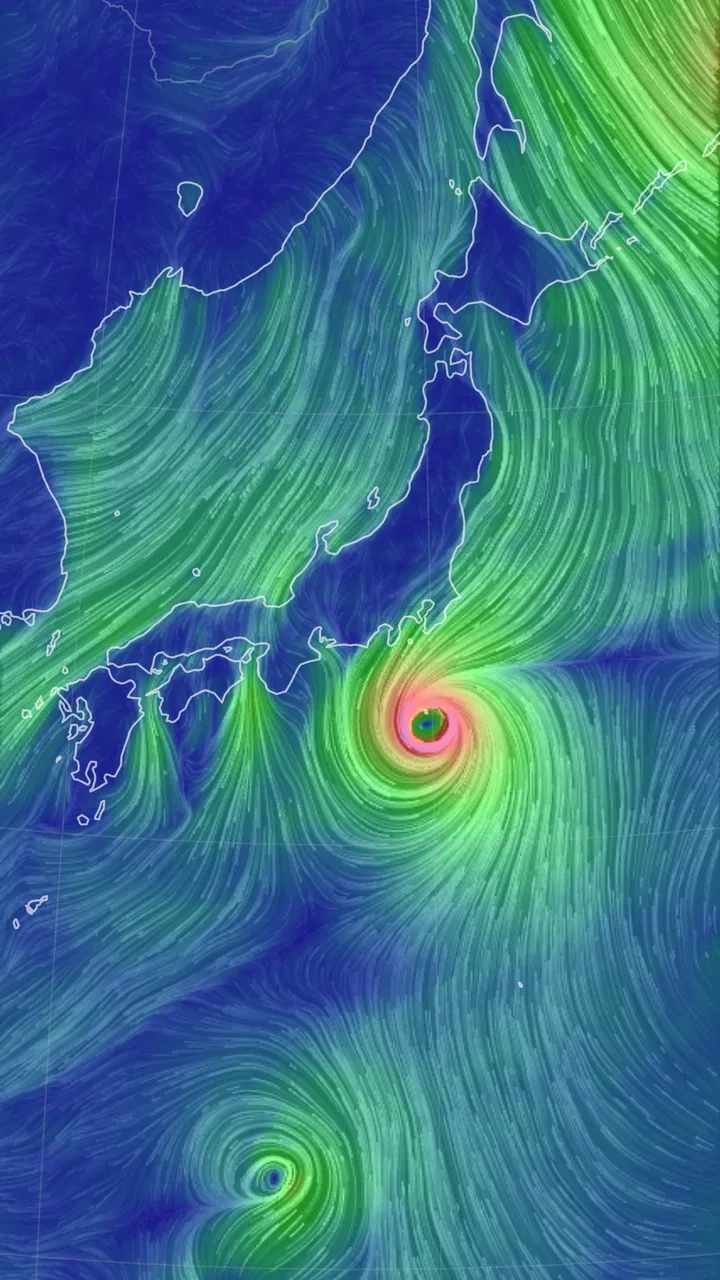
The central appeal is visual. Instead of presenting weather as a stack of isolated numbers, Nullschool turns atmospheric and environmental information into something I can explore spatially. Wind becomes easier to interpret when I can follow its direction over a region, and ocean or pollution layers add context that ordinary forecast cards often leave out. I found myself using the map less like a report and more like a moving explanation of conditions.
You May Also Like

 Blood Strike: 2.5 Anniversary
Blood Strike’s Loadouts Turn Every Drop Into a Tactical Gamble
A close look at Blood Strike’s custom loadouts: how fast access to signature weapons reshapes its battle royale rhythm, rewards preparation, and narrows the gap between fights.

 Pandora - Music & Podcasts
Pandora’s Music Is Easy to Start, but Harder to Recover
Pandora’s strength is its low-effort path from a seed to a station. Its weak spot is how much confidence it asks you to place in connection, setup, and quiet recovery.

 8 Ball Pool
 Is Built on Rivalries, Rematches, and Routine
A close look at the rivalries, rematches, shared routines, and unanswered safety questions that turn a quick pool match into a persistent mobile community.

 Samsung Music
’s Quiet Strength Is Playing What You Already Own
Its reach comes less from spectacle than from dependable access to a personal library. That simplicity is both the app’s strongest retention engine and its ceiling.

 AccuWeather: Weather Radar
AccuWeather Review: A Quick, Clear Forecast for Everyday Decisions
For everyday plans, the best forecast is the one you can understand quickly. AccuWeather makes rain timing, radar, and local conditions easy to act on, with a few trade-offs.

 Hill Climb Racing
Why Hill Climb Racing Still Turns Crashes Into One More Run
A tiny car, a bumpy hill and one more upgrade: Hill Climb Racing keeps resurfacing because its simple chaos makes every near-miss feel personal.
More From Our News Desk
View All News


That approach depends heavily on connectivity. When the network is responsive, the experience feels immediate: I can move around, change my area of interest, and investigate a broader pattern without waiting for a separate page for every location. The value is not only the information itself but the relationship between places. A local forecast may tell me that wind is strong; a visual map can help me understand whether that wind is part of a larger flow.
The trade-off is equally clear. A connected map experience can be more demanding than a static forecast screen. If the connection slows while I am exploring, the experience becomes less fluid and the visual explanation loses some of its impact. I would not treat this as a replacement for a basic weather widget when I need an instant glance. It is better suited to moments when I have enough attention to explore and interpret what I am seeing.
The strongest reason to use this app is the way it connects local conditions with a larger environmental picture. That is particularly useful for people who enjoy weather systems, sailing-related planning, photography, outdoor trips, air-quality awareness, or simply learning how atmospheric movement works. It is less useful for someone who wants a short sentence such as “rain expected this afternoon” and nothing more.
What I would do before leaving home
A realistic everyday use would be planning a long walk or cycle ride. I would first look at the local wind pattern rather than relying only on the forecast temperature. Then I would zoom out to see whether the wind appears to be part of a broader system and inspect the pollution layer if air conditions matter for the route. That extra context could influence whether I choose an exposed path, postpone exercise, or take a shorter route through a more sheltered area.
This workflow is more useful than opening the app only after I am already outside. At home, on a reliable connection, I can take time to compare the map with the route I have in mind. Once I leave, I would use it more selectively because a constantly moving environmental map can consume attention and may be less comfortable on a weak mobile connection.
Using it in different mobile situations
On a phone, the app makes the most sense when I have a clear question. “Which way is the wind moving around this coastline?” is a good question. “What is the weather?” is too broad, because the answer may require more interpretation than a standard forecast app provides. I recommend opening it with a purpose, then narrowing the map to the area that matters instead of wandering across the entire globe without a plan.
The interface is also better for broad comparisons than for tiny local distinctions. A map can reveal a regional flow, but I would avoid treating its visual appearance as a substitute for a precise local observation. For a commute, I would still want a conventional forecast source for timing, precipitation, and immediate alerts. Nullschool is more valuable as a layer of understanding around those practical decisions.
Travel is another situation where the app can be interesting but not sufficient by itself. Before a trip, I could use it to compare the environmental picture between my departure point and destination. That may help me recognize whether conditions are broadly calm or part of a more active pattern. However, I would not rely on it alone for transport decisions, safety-critical outdoor activity, or rapidly changing local warnings. A specialist service with explicit alerts is the better choice when a missed warning has serious consequences.
The app can also suit a larger screen better than a hurried one-handed phone session, simply because map exploration benefits from room to move and inspect. On a small display, I sometimes prefer a short, deliberate interaction: check one layer, examine one region, then close it. Trying to study several environmental views while walking would be uncomfortable and potentially unsafe. The best mobile habit is to explore while stationary and use the result to guide a decision afterward.
Three practical habits that improve the experience
Start with the area you actually care about, then zoom out only after understanding the local view. This prevents the global scale from becoming visually impressive but practically vague.
Use wind, ocean, and pollution as separate questions rather than expecting one layer to answer everything. Each view adds a different kind of context, and combining them too quickly can make the map harder to interpret.
Check the app before a planned activity, not repeatedly during it. This reduces distraction and avoids turning a connected visual tool into something you depend on every few minutes.
These habits are not about making the app complicated. They are about respecting what it does well. Its strength is exploration and comparison, so I get more from it when I define the decision first. If I open it without knowing what I want to learn, the map can become a fascinating detour rather than a useful answer.
What happens when connection or attention fails
The most important limitation is that the experience is shaped by access to current map information. I would not assume that every part of the app remains equally useful when the connection is unavailable or unstable. A person planning a remote hike, boat trip, or flight should therefore prepare with other resources rather than treating this as a guaranteed field reference.
When loading becomes slow, my practical recovery approach would be simple: stop moving around the map, return to the specific region I need, and wait for that view to become usable before changing layers again. Repeatedly zooming, panning, and switching between environmental views during a weak connection is likely to make the session feel worse. A focused request is easier to manage than a long exploratory one.
If the app does not give me the quick answer I need, I would switch temporarily to a regular forecast service rather than forcing Nullschool into the wrong role. That is not a criticism of its concept. It is a reminder that an interactive environmental map and a notification-oriented weather service solve different problems. Recovery sometimes means choosing the appropriate tool, not trying harder with the same one.
There is also a human failure mode: misreading a beautiful visualization as a precise prediction. I found the moving presentation engaging, but engagement can encourage overconfidence. I would treat the map as context and evidence for a broader pattern, then confirm important decisions through an appropriate local forecast or official warning source. For casual exploration, that distinction is easy to manage; for safety-sensitive plans, it matters a great deal.
When another weather app is the better option
I would choose a conventional weather app when my priority is speed, alerts, hourly precipitation, or a simple forecast for one location. Those tools usually make the next practical action obvious. Nullschool is the better choice when I want to see relationships across space, understand wind movement, inspect ocean conditions, or consider pollution as part of a wider picture.
I would also skip it if I dislike map-based exploration. The app asks me to look, compare, and interpret rather than simply read. That is appealing to curious users but inefficient for someone who wants a minimal interface. Likewise, people with unreliable connectivity should not make it their only weather resource, especially before activities where timely information is essential.
Another trade-off concerns paid content. The app itself is free to start, which lowers the barrier to testing its style. Optional purchases can cost from roughly three dollars to nearly fifty dollars per item, so I would avoid buying anything until I know exactly which part of the experience I use regularly. For me, the right question is not whether an extra exists, but whether it improves a repeated workflow enough to justify the expense.
Who will get the most from Nullschool
I can recommend it to visually minded weather enthusiasts, students exploring environmental systems, travelers who like regional context, and outdoor users who want more than a single local number. It is particularly compelling for anyone who has looked at a weather forecast and wondered how the conditions connect beyond one city. The combination of wind, ocean, and pollution gives the app a distinct identity within the weather category.
I would be more cautious recommending it to parents who need immediate child-safety alerts, commuters checking rain in a hurry, or people preparing for serious outdoor exposure. Those users may benefit more from an app built around warnings, concise forecasts, and dependable quick access. Nullschool can complement that setup, but I would not make it the sole source for decisions where timing and official alerts are critical.
The Everyone age rating makes it approachable for general use, but accessibility in practice depends on patience and visual interpretation. A younger user may enjoy the animated map, while someone who prefers text-first information may find it less direct. I would introduce it by asking a concrete question—such as where the strongest wind appears to be moving—rather than presenting it as a complete replacement for a familiar forecast.
My connectivity-conscious routine
My preferred routine would be to open the app on a stable connection, inspect the relevant region, and note the practical conclusion before leaving. For example, I might decide that a coastal route looks too exposed, or that pollution conditions make an indoor workout more sensible. I would then use a conventional source for urgent updates rather than keeping the interactive map open continuously.
That routine also keeps data use purposeful. I would avoid repeatedly refreshing broad areas when a single focused check answers the question. I would not claim that this guarantees lower data consumption, but reducing unnecessary exploration is a sensible habit for anyone on a limited mobile plan. It also makes the app easier to use in places where connectivity fluctuates between strong and weak.
If I were traveling, I would check the destination before departing and keep another reliable weather source available. The app is excellent for building a mental picture, but a mental picture is not the same thing as a current alert. This distinction is one of the most useful lessons I took from using it: visual context improves judgement, while specialized alerts remain important for immediate risk.
My final connectivity verdict
Nullschool - explore weather is a distinctive free weather app from Nullschool Technologies Inc. Its appeal comes from turning wind, ocean, and pollution into an experience I can investigate rather than a list I can skim. The current version, 2026.1, reflects an actively maintained product, while the strong 4.9 average suggests that the people who have rated it generally appreciate its approach.
For me, connectivity is not a minor background detail here; it is part of the experience. A good connection lets the map become an exploratory tool, while a poor one reduces the app to an uncertain or interrupted reference. I would use it before an activity, during focused research, or whenever I want environmental context across a region. I would not depend on it alone for urgent forecasts, official warnings, or remote trips where access may be unreliable.
The best way to judge it is to try the free version with one real question in mind. If you enjoy following patterns and comparing areas, you may find more value here than in another standard forecast screen. If you only want a quick local answer, the usual weather alternative will probably be more efficient. My recommendation is positive, but specific: use it as an exploratory weather map and a companion to practical forecast tools, not as a universal replacement for them.
FAQs for Nullschool - explore weather
01What is Nullschool - explore weather all about?
Nullschool - explore weather is a dynamic weather visualization app that allows users to explore global weather patterns in real-time. It provides detailed information on wind patterns, temperature, humidity, and ocean currents. The app is designed for both casual weather enthusiasts and professionals who need accurate weather data for various applications.
02Is Nullschool - explore weather available on both Android and iOS?
Yes, Nullschool - explore weather is available for download on both Android and iOS platforms. Users can find the app on the Google Play Store and Apple App Store, ensuring accessibility across a wide range of devices. The app is optimized for mobile use, providing a seamless experience on smartphones and tablets.
03Does Nullschool - explore weather require an internet connection to function?
Yes, Nullschool - explore weather requires an active internet connection to access real-time weather data. The app pulls information from various online sources to provide the most up-to-date and accurate weather visualizations. Users will need a stable internet connection to fully utilize the app's features.
04Are there any subscription fees for using Nullschool - explore weather?
Nullschool - explore weather offers a free version with basic features for users to explore. However, there might be premium features available through a subscription model, offering advanced data and additional functionalities. It's advisable to check the app's official page for the most current pricing and subscription details.
05How accurate is the weather data provided by Nullschool - explore weather?
The app sources its data from reputable meteorological organizations, ensuring a high level of accuracy. While the visualizations are highly reliable, users should always cross-reference with local weather forecasts for critical decision-making. The app is designed to provide an engaging and informative weather viewing experience.
Pros
- Interactive global weather visualization.
- Real-time data updates for accuracy.
- User-friendly interface with smooth navigation.
- Detailed layer selection for various weather elements.
- Educational tool for weather enthusiasts.
Cons
- Requires a stable internet connection.
- Limited offline functionality.
- Complex data might overwhelm casual users.
- No personalized weather alerts.
- High data usage for detailed views.

Nullschool - explore weather
Gallery